
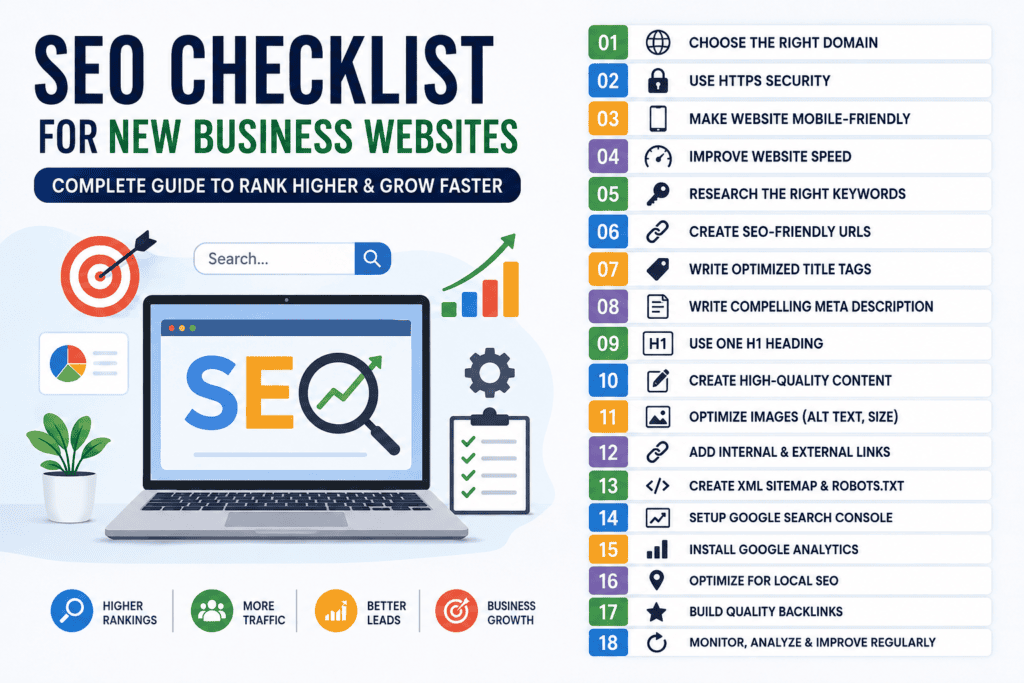
Starting a new business website is exciting, but simply launching a website is not enough. If people cannot find your website on Google, you may lose valuable customers every day. This is where a proper SEO Checklist for New Business Websites becomes important.
At DigitalOrbitz, we help startups and small businesses build a strong online presence through SEO, website optimization, content marketing, and digital advertising. Our goal is to help businesses improve their search rankings, attract qualified visitors, and turn those visitors into loyal customers. This guide shares the same practical SEO approach that every new business website should follow.
What Is SEO?
SEO stands for Search Engine Optimization. It is the process of improving your website so search engines like Google can understand your content and show it to people searching for related topics.
Good SEO helps your website:
- Rank higher in Google search results
- Get more organic traffic
- Build trust with visitors
- Generate quality leads
- Increase sales without paying for every click
SEO is not a one-time task. It is an ongoing process that keeps your website healthy and competitive.
Why Every New Business Website Needs SEO
Many business owners believe that creating a website is enough. Unfortunately, that is not true.
Imagine opening a beautiful shop in the middle of a forest. Even if your products are excellent, no one will visit because they cannot find you.
Your website works the same way.
SEO helps customers discover your business when they search for products or services online.
Without SEO, your competitors may receive the traffic that could have been yours.
Some benefits of SEO include:
- Higher search rankings
- More website visitors
- Better user experience
- More enquiries
- Better conversion rates
- Long-term business growth
The Ultimate SEO Checklist for New Business Websites
Follow this checklist before and after launching your website.
1. Choose the Right Domain Name
Your domain name is your online identity.
Choose a domain that is:
- Easy to remember
- Easy to spell
- Short and simple
- Related to your business
- Professional
Whenever possible, choose a .com domain because many users trust it.
Avoid:
- Long names
- Numbers
- Hyphens
- Confusing spellings
A clean domain creates a better first impression.
2. Use HTTPS Security
Website security is one of Google’s ranking factors.
Install an SSL certificate so your website loads with:
https://
instead of
http://
Visitors trust secure websites more.
A secure website also protects customer information.
Most hosting companies provide free SSL certificates.
Never launch a business website without HTTPS.
3. Make Your Website Mobile-Friendly
Today, most people browse websites using smartphones.
Google also uses mobile-first indexing.
This means Google mainly looks at the mobile version of your website before ranking it.
Check your website on different screen sizes.
Make sure:
- Text is readable
- Buttons are easy to click
- Images fit correctly
- Menus work properly
- Pages load quickly
A mobile-friendly website improves both rankings and user experience.
4. Improve Website Loading Speed
People do not like slow websites.
Research shows that many users leave if a page takes more than a few seconds to load.
Google also considers page speed while ranking websites.
Ways to improve speed include:
- Compress images
- Use WebP images
- Enable browser caching
- Minify CSS and JavaScript
- Remove unnecessary plugins
- Choose reliable hosting
Fast websites create happier visitors.
They also increase conversions.
5. Research the Right Keywords
Keyword research is the foundation of SEO.
Before writing any page, understand what your customers search for.
For example:
Instead of targeting
Shoes
Target
Best running shoes for beginners
Long-tail keywords usually have:
- Less competition
- Better conversion rates
- Higher search intent
Use a mix of:
- Primary keywords
- Secondary keywords
- Long-tail keywords
- Question-based keywords
- Local keywords
Choose keywords that match your customers’ needs.
Do not guess.
Research first.
6. Create SEO-Friendly URLs
Your page URLs should be clean and descriptive.
Good example:
yourwebsite.com/seo-checklist-new-business-websites
Poor example:
yourwebsite.com/page?id=4568
Good URLs help:
- Google understand your page
- Users remember your content
- Improve click-through rates
Keep URLs:
- Short
- Relevant
- Lowercase
- Easy to read
Separate words using hyphens.
Avoid unnecessary numbers or symbols.
7. Write an Optimized Title Tag
The title tag is one of the first things users notice on Google.
It should clearly explain your page.
A good title should:
- Include your primary keyword
- Stay within about 60 characters
- Encourage users to click
- Be unique for every page
Example:
SEO Checklist for New Business Websites | Complete Beginner’s Guide
Avoid stuffing multiple keywords into one title.
Write naturally.
8. Create a Compelling Meta Description
A meta description summarizes your page.
Although it is not a direct ranking factor, it improves click-through rates.
A strong meta description should:
- Include your keyword naturally
- Explain the page clearly
- Encourage users to click
- Stay around 150–160 characters
Example:
“Follow this complete SEO Checklist for New Business Websites to improve Google rankings, attract more visitors, and grow your business online.”
Think of it as your advertisement on Google Search.
Make it interesting and useful.
9. Use One H1 Heading on Every Page
The H1 heading is the main title of your page.
Google uses it to understand what your page is about.
Every page should have:
- Only one H1 heading
- Your primary keyword in the H1
- A clear and simple title
Example:
SEO Checklist for New Business Websites
Do not use multiple H1 headings on the same page.
After the H1, use H2 and H3 headings to organize your content.
A proper heading structure makes your content easier to read.
10. Write High-Quality Content
Content is one of the most important parts of SEO.
Google wants to rank websites that provide useful and original information.
Your content should be:
- Original
- Helpful
- Easy to understand
- Well-organized
- Updated regularly
Avoid copying content from other websites.
Answer your readers’ questions.
Explain topics clearly.
Use examples whenever possible.
Quality content builds trust with both users and search engines.
11. Optimize Every Image
Images make your website attractive, but large images can slow it down.
Before uploading images:
- Resize them
- Compress them
- Use WebP format if possible
- Give each file a meaningful name
Instead of:
IMG12345.jpg
Use:
seo-checklist-new-business-websites.jpg
Also, add alt text to every image.
Example:
Alt Text: Business owner checking an SEO checklist for a new website.
Alt text helps:
- Search engines understand images
- Improve accessibility
- Increase chances of appearing in Google Images
12. Add Internal Links
Internal links connect one page of your website to another.
For example, a blog about SEO can link to your SEO Services page.
Internal links help:
- Users find more information
- Google discover your pages
- Spread page authority
- Keep visitors on your website longer
Every blog should naturally link to:
- Service pages
- Contact page
- Related blog posts
- Homepage
Do not add random links.
Only link to relevant pages.
13. Add External Links to Trusted Sources
External links point to other trusted websites.
They show that your content is based on reliable information.
Examples include links to:
- Microsoft
- Government websites
- Industry research
- Trusted marketing resources
Do not link to low-quality or spam websites.
Choose authoritative sources.
14. Create an XML Sitemap
An XML sitemap helps search engines find your website pages.
Think of it as a roadmap for Google.
Most SEO plugins create an XML sitemap automatically.
Once created, submit it to Google Search Console.
This helps Google discover:
- Blog posts
- Service pages
- Landing pages
- Product pages
A sitemap improves website indexing.
15. Create a Robots.txt File
A robots.txt file tells search engines which pages they can crawl.
It also prevents search engines from indexing unnecessary pages.
Examples include:
- Admin pages
- Login pages
- Duplicate content
- Temporary pages
A proper robots.txt file improves crawling efficiency.
16. Set Up Google Search Console
Google Search Console is a free SEO tool.
Every website owner should use it.
It helps you:
- Submit your sitemap
- Monitor indexing
- Check keyword rankings
- Find technical errors
- Identify broken pages
- Improve website performance
Review Search Console regularly.
Fix errors as soon as they appear.
17. Install Google Analytics
Google Analytics helps you understand your visitors.
You can track:
- Number of visitors
- Traffic sources
- Most popular pages
- User behavior
- Conversions
- Bounce rate
This information helps you improve your website over time.
Make decisions based on data instead of assumptions.
18. Optimize for Local SEO
If your business serves a specific city or region, local SEO is essential.
Start by creating and optimizing your Google Business Profile.
Then:
- Add your business address
- Add your phone number
- Add business hours
- Upload real photos
- Collect customer reviews
- Respond to reviews
Also, include your city or service area naturally on important pages.
Example:
Instead of only writing:
“We provide SEO services.”
Write:
“We provide SEO services for businesses in Delhi NCR.”
Local SEO helps nearby customers find your business more easily.
19. Make Navigation Simple
Visitors should find information quickly.
Use a simple menu structure.
Include pages like:
- Home
- About Us
- Services
- Blog
- Contact
Avoid creating too many menu items.
Clear navigation improves user experience and helps Google crawl your website.
20. Create an Easy-to-Read Website Structure
Good design improves SEO indirectly.
Break content into:
- Short paragraphs
- Bullet points
- Numbered lists
- Headings
- Images
- Tables where needed
Avoid large blocks of text.
People prefer content that is easy to scan.
A clean layout keeps visitors engaged.
21. Add Clear Calls to Action (CTA)
Every page should guide visitors toward the next step.
Examples of CTAs include:
- Contact Us
- Request a Free Quote
- Book a Consultation
- Call Now
- Get Started Today
A strong CTA improves conversions.
Do not leave visitors wondering what to do next.
22. Make Contact Information Easy to Find
Trust is important for SEO and conversions.
Display your:
- Business name
- Phone number
- Email address
- Contact form
- Business location (if applicable)
Place this information on your Contact page and in the website footer.
Visitors should never struggle to contact you.
23. Use Schema Markup
Schema markup is a type of code that helps search engines understand your website better.
It can improve how your pages appear in search results.
Common schema types include:
- Organization
- Local Business
- Article
- FAQ
- Breadcrumb
- Product
- Service
- Review
Schema may help your website earn rich results, which often receive more clicks.
If you use WordPress, many SEO plugins can add schema automatically.
24. Create SEO-Friendly Blog Content
A blog helps you target keywords that your customers search for every day.
Instead of writing only about your services, answer common questions.
For example:
- What is SEO?
- How does Google Ads work?
- Why is website speed important?
- How much does digital marketing cost?
- How can small businesses get more leads?
Publish helpful articles consistently.
Aim for at least two to four quality blog posts each month.
Fresh content tells Google that your website is active.
25. Build High-Quality Backlinks
Backlinks are links from other websites to your website.
Google treats quality backlinks as votes of confidence.
Good ways to earn backlinks include:
- Writing guest posts
- Publishing helpful guides
- Creating original research
- Sharing case studies
- Listing your business in trusted directories
- Getting featured on industry websites
Never buy backlinks from spam websites.
Low-quality backlinks can hurt your rankings.
Focus on quality instead of quantity.
26. Improve User Experience (UX)
Google wants users to enjoy visiting your website.
A good user experience includes:
- Fast loading pages
- Mobile-friendly design
- Easy navigation
- Clear headings
- Readable fonts
- Helpful content
- Visible buttons
Ask yourself:
“Can a visitor find what they need within a few seconds?”
If the answer is yes, you are moving in the right direction.
27. Fix Broken Links
Broken links lead visitors to pages that no longer exist.
They create a poor experience.
Regularly check your website for:
- Broken internal links
- Broken external links
- Missing images
- 404 errors
Repair or remove broken links as soon as possible.
A healthy website is easier for search engines to crawl.
28. Avoid Duplicate Content
Every page should have unique content.
Avoid copying:
- Blog posts
- Product descriptions
- Service pages
- Meta titles
- Meta descriptions
Duplicate content can confuse search engines.
Write original content for every page.
If similar pages are necessary, use canonical tags where appropriate.
29. Update Old Content
SEO is not a one-time task.
Review your older pages every few months.
Update:
- Statistics
- Screenshots
- Examples
- Internal links
- Keywords
- Images
Refreshing old content can improve rankings without creating a brand-new article.
30. Track Your SEO Performance
You cannot improve what you do not measure.
Monitor important metrics such as:
- Organic traffic
- Keyword rankings
- Click-through rate (CTR)
- Impressions
- Bounce rate
- Average engagement time
- Conversions
- Leads generated
Review your reports every month.
Use the data to improve your SEO strategy.
Common SEO Mistakes to Avoid
Many new business owners make simple mistakes that prevent their websites from ranking well.
Avoid these common problems:
- Ignoring keyword research
- Using multiple H1 headings
- Publishing thin content
- Copying content from other websites
- Forgetting image alt text
- Not optimizing for mobile devices
- Slow website speed
- Broken links
- Missing meta titles
- Missing meta descriptions
- No internal linking
- Not submitting an XML sitemap
- Ignoring Google Search Console errors
- Publishing low-quality blogs
- Buying spam backlinks
- Keyword stuffing
- Not updating old content
Avoiding these mistakes will save time and improve your results.
Monthly SEO Maintenance Checklist
SEO works best when you maintain your website regularly.
Every month, complete the following tasks:
✅ Publish at least two high-quality blog posts.
✅ Check Google Search Console for errors.
✅ Review Google Analytics reports.
✅ Update old articles.
✅ Improve page speed.
✅ Fix broken links.
✅ Add internal links to new content.
✅ Compress newly uploaded images.
✅ Reply to Google Business Profile reviews.
✅ Check keyword rankings.
✅ Look for new backlink opportunities.
✅ Review competitor websites.
A monthly routine keeps your website healthy and competitive.
Quick SEO Checklist for New Business Websites
Before launching your website, confirm that you have completed these tasks:
- Secure HTTPS website
- Mobile-friendly design
- Fast loading pages
- Keyword research completed
- SEO-friendly URLs
- Optimized title tags
- Meta descriptions
- One H1 heading
- Proper H2 and H3 headings
- High-quality content
- Optimized images
- Image alt text
- Internal linking
- External links to trusted websites
- XML sitemap
- Robots.txt file
- Google Search Console
- Google Analytics
- Google Business Profile
- Schema markup
- Contact page
- Clear call-to-action buttons
- Easy navigation
- Regular blog publishing
- Monthly SEO review
If you complete every item on this checklist, your website will have a strong SEO foundation.
Conclusion
Launching a website is only the first step. The real challenge is helping potential customers find your business online. A well-planned SEO Checklist for New Business Websites ensures that your website is easy to crawl, fast to load, simple to navigate, and filled with valuable content.
SEO is a long-term investment, but it delivers lasting results. By following the steps in this guide, you can improve your search visibility, attract more qualified visitors, build trust with your audience, and generate more enquiries over time.
Remember that SEO is not about tricking search engines. It is about creating the best possible experience for your visitors. Focus on helpful content, technical improvements, and regular updates, and your website will continue to grow.
If you need expert help with SEO, website optimization, local SEO, or digital marketing, DigitalOrbitz can help you create a strategy that supports long-term business growth. Whether you are launching your first website or improving an existing one, a strong SEO foundation will help your business compete with confidence in today’s digital world.
Frequently Asked Questions (FAQs)
1. What is an SEO checklist?
An SEO checklist is a list of important tasks that help improve a website’s visibility on search engines like Google. It includes technical SEO, on-page SEO, content optimization, and website performance improvements.
2. Why is SEO important for new business websites?
SEO helps new businesses attract organic traffic, improve search rankings, build trust, and generate leads without relying only on paid advertising.
3. How long does SEO take to show results?
Most websites begin to see noticeable improvements within three to six months. The timeline depends on your competition, website quality, and consistency.
4. How often should I update my website for SEO?
Review your website every month. Update old content, fix technical issues, publish new blog posts, and monitor your SEO performance regularly.
5. Do I need a blog for SEO?
Yes. A blog allows you to target more keywords, answer customer questions, build authority, and attract more organic traffic.
6. Can I do SEO myself?
Yes. Many basic SEO tasks can be done by business owners. However, hiring SEO professionals can help you avoid mistakes and achieve better results faster.
7. What is the most important SEO factor?
There is no single ranking factor. High-quality content, a fast website, mobile-friendly design, keyword optimization, technical SEO, and quality backlinks all work together to improve rankings.
8. Is local SEO important for small businesses?
Yes. Local SEO helps businesses appear in local search results and Google Business Profile listings, making it easier for nearby customers to find and contact them.
